
Today’s conference rooms need to do more than provide a table and chairs. With businesses relying on video meetings, presentations, collaboration and hybrid work, the right audio visual technology can make meetings more productive, professional and easier to manage.
A modern conference room should bring together displays, cameras, microphones, speakers, connectivity, controls and networking into one reliable system. When these components are properly designed and integrated, employees can walk into a room, start a meeting and focus on the conversation instead of troubleshooting technology.
For businesses planning a new conference room or upgrading an existing space, AVE Integration’s conference room setup services can help create a system tailored to the room and the way your team works.
Professional Displays
A quality display is one of the most important components of a conference room. Whether employees are presenting a slideshow, reviewing documents, collaborating on a project or meeting with remote participants, everyone needs to clearly see what is being shared.
Depending on the size and purpose of the room, a conference room may use:
- Large commercial displays
- Multiple displays
- Interactive displays
- Projectors and projection screens
- Displays dedicated to video conferencing
The right configuration depends on the size of the room, viewing distance and how the space will be used.
For larger conference rooms, multiple displays can be particularly helpful. One screen can show remote meeting participants while another displays a presentation or shared content.
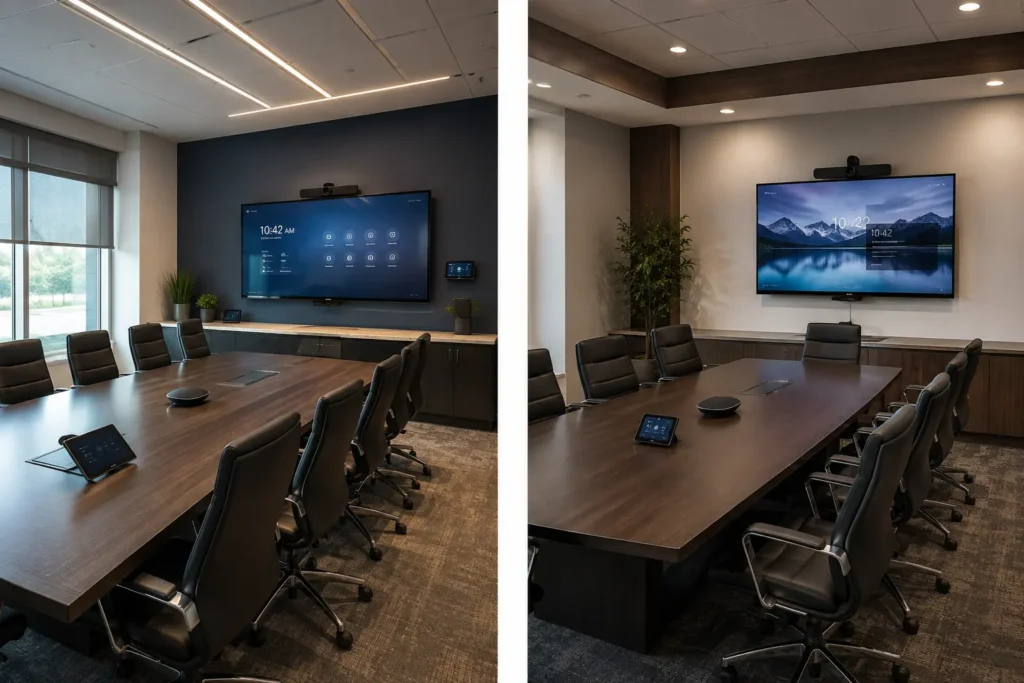
High-Quality Conference Room Cameras
Video conferencing has become a standard part of business communication. A good conference room camera helps remote participants feel like they are actually part of the meeting.
Camera selection and placement are important considerations. The camera needs to provide an appropriate view of everyone at the conference table without creating awkward angles or leaving participants outside the frame.
Depending on the room, businesses may benefit from features such as:
- Wide-angle coverage
- Pan, tilt and zoom capabilities
- Automatic framing
- Multiple camera locations
- High-definition video
A professionally integrated camera system can make virtual meetings look significantly more polished while making it easier for remote employees, clients and partners to participate.
Conference Room Microphones
Great video doesn’t matter much if people on the other end can’t hear the conversation.
Conference room microphones should be selected based on the room’s size, layout and seating arrangement. A small huddle room may only require a simple microphone solution, while a larger boardroom may need multiple microphones positioned throughout the space.
Proper microphone placement can help reduce common problems such as:
- Participants sounding too quiet
- People having to lean toward a microphone
- Background noise
- Uneven audio levels
- Remote participants repeatedly asking, “Can you hear me?”
The goal is simple: everyone in the room should be heard clearly without having to think about the microphones.
Quality Speakers
The other half of the audio equation is what people in the conference room hear.
Conference room speakers should provide clear, evenly distributed sound throughout the space. The right solution helps employees hear remote participants, presentations, videos and other audio without needing to constantly adjust the volume.
Depending on the room design, speakers may be integrated into ceilings, walls or other locations to provide a clean appearance while distributing sound effectively.
Good conference room audio should be clear enough that participants don’t have to strain to follow a conversation.
Easy Connectivity
One of the most frustrating conference room experiences is trying to figure out how to connect a laptop to the room’s technology.
Modern conference rooms should make it easy for employees to connect their devices and share content.
A properly designed system can provide options for:
- Wired laptop connections
- Wireless screen sharing
- HDMI connectivity
- USB connectivity
- Video conferencing systems
- Presentation devices
The goal is to eliminate the pile of adapters and cables that often ends up on the conference table.
Simple Conference Room Controls
Even the most advanced AV system isn’t very useful if employees don’t know how to operate it.
A modern conference room should have simple, intuitive controls that allow users to operate the technology without needing an IT specialist every time they have a meeting.
Depending on the system, controls may allow users to:
- Turn displays on and off
- Adjust volume
- Select inputs
- Start presentations
- Control cameras
- Manage room lighting
- Connect to video conferencing systems
At AVE Integration, conference room systems can be designed around the way your business actually uses the space, helping make complicated technology easier for employees to operate.
Reliable Networking
Conference room AV doesn’t operate in isolation. Modern meeting spaces rely heavily on the network.
Video conferencing, wireless presentations, cloud-based applications and other technologies all depend on reliable connectivity. A poorly designed network can create buffering, dropped connections, poor video quality and other frustrating problems.
That makes network infrastructure an important part of conference room planning, particularly for businesses building or renovating their office technology.
Professional network and data installation can help provide the reliable infrastructure that modern AV systems require.
Don’t Forget the Room Itself
Technology is only one part of a successful conference room.
The physical design of the room can have a major impact on how well the AV system performs. Consider:
- Room size and seating capacity
- Table configuration
- Lighting
- Acoustics
- Window placement
- Camera positioning
- Display viewing angles
- Power and data locations
Planning these factors before installation makes it easier to create a system that works naturally within the space.
Bringing Everything Together
The biggest advantage of a professionally integrated conference room isn’t necessarily any individual piece of equipment. It’s how all of the components work together.
Your displays, cameras, microphones, speakers, connectivity, controls and network should function as one cohesive system.
Instead of employees asking:
“Which cable do I need?”
“Why isn’t the camera working?”
“Can everyone hear me?”
“How do I get this presentation on the screen?”
The technology should simply work.
Build a Conference Room Designed for Your Business
Every business has different conference room needs. A small huddle space requires a different solution than a large executive boardroom, training room or multi-purpose meeting space.
AVE Integration can design and install customized conference room AV systems that bring the technology together into an easy-to-use solution.
Whether you’re building a new conference room, renovating an office or upgrading outdated equipment, professional AV integration can help you create a meeting space that’s reliable, easy to use and ready for today’s hybrid workplace.
Ready to improve your conference room? Contact AVE Integration to discuss your space and find an AV solution designed around your business needs.